
If you have been following AI development recently, you may have seen the term MCP everywhere. But what is MCP, and why are developers talking about it?
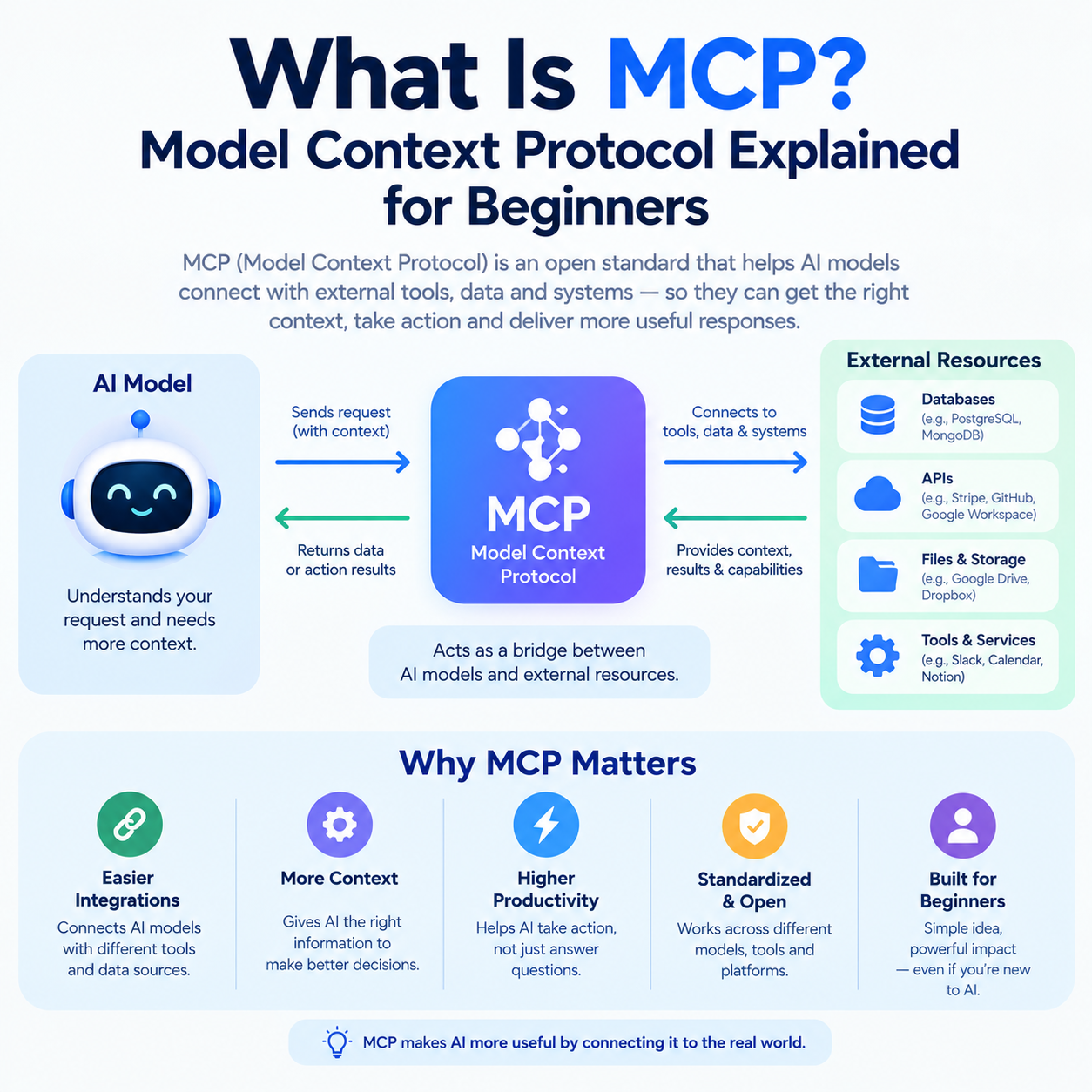
MCP stands for Model Context Protocol. It is an open standard that allows AI applications to connect with external data sources, tools and services in a standardized way. Instead of building a separate custom integration for every AI application and every external system, developers can use MCP as a common communication layer.
Think of it like a standard connector between an AI application and the software it needs to work with.
For example, an AI assistant might need access to your files, GitHub repositories, database, business software or another service. MCP provides a standardized way for that AI application to discover available capabilities and use them.
Let's break down what is MCP in simple terms.
What Does MCP Stand For?
MCP stands for Model Context Protocol.
It was introduced by Anthropic in November 2024 as an open standard for connecting AI assistants with external systems and data. The project has since developed into a broader open ecosystem, with MCP being donated to the Linux Foundation's Agentic AI Foundation in 2025.
The important words are:
Model — AI models such as large language models.
Context — Information, data and capabilities that help the AI perform a task.
Protocol — A defined set of rules for how software communicates.
So, in simple language:
MCP is a common language that helps AI applications communicate with external tools and sources of information.
MCP itself is not an AI model. It does not replace an LLM such as Claude or Gemini. Instead, it helps AI applications connect those models with useful external capabilities.
Why Was MCP Created?
Imagine you build an AI assistant that needs to work with five different systems:
GitHub
Google Drive
PostgreSQL
Slack
A company's internal API
Without a common standard, each integration can require its own connection logic.
That creates a growing collection of custom integrations.
MCP was designed to provide a more standardized approach.
An AI application can act as an MCP host, connect through MCP clients, and communicate with different MCP servers. Each server can expose specific resources, prompts or tools.
The idea is similar to having a universal connector instead of designing a completely different connector for every device.
This does not mean every integration becomes automatically simple. Authentication, permissions, security and application-specific logic still matter. MCP standardizes communication; it does not magically remove all integration work.
How Does MCP Work?
A simple MCP setup has three important parts:
AI application → MCP client → MCP server → external system
The official architecture describes three core components: host, client and server. A host can manage multiple clients, with each client maintaining a connection to a particular server.
Let's look at each one.
1. MCP Host
The MCP host is the application that the user interacts with.
Think of the host as the main AI application or environment coordinating everything.
Its responsibilities can include:
Managing MCP clients
Managing permissions
Connecting AI models with available capabilities
Handling user authorization
Coordinating context from different connections
The host is therefore more than just the AI model itself. It provides the environment in which MCP connections operate.
2. MCP Client
The MCP client is the component inside the host that communicates with an MCP server.
A useful mental model is:
Host = application
Client = connection inside that application
The official architecture describes each client as maintaining an isolated connection to a particular server.
For example, an AI coding application could have separate MCP client connections for a GitHub server and a database server.
3. MCP Server
The MCP server provides capabilities to the AI application.
Despite the name, an MCP server does not necessarily mean a huge cloud server. It can be a local process or a remote service.
An MCP server can expose:
Tools — actions the AI can invoke
Resources — information or data that can provide context
Prompts — reusable prompt templates
For example, a GitHub-related MCP server could expose tools for interacting with repositories, while a database-related server could provide tools for querying data.
The server is responsible for the capabilities it exposes, while the host controls how those capabilities are made available to the AI application.
MCP Explained With a Simple Example
Imagine you ask an AI coding assistant:
“Check the latest issues in my project and tell me which ones are related to authentication.”
The AI needs access to your project's issue tracker.
A simplified MCP flow could look like this:
You ask the AI a question.
The AI application determines that an external tool may be useful.
Its MCP client communicates with the appropriate MCP server.
The server exposes a tool for retrieving issues.
The tool is called with the required parameters.
The server retrieves the relevant information.
The result is returned to the AI application.
The AI uses that information to generate its response.
The important point is that the AI does not need to know every implementation detail of the external system.
The MCP interface provides a standardized way to discover and use the capability.
What Can MCP Servers Provide?
MCP is not limited to one type of information.
Tools
Tools are executable functions that an AI model can invoke.
Examples include:
Searching a database
Calling an external API
Creating a file
Searching GitHub
Performing calculations
Updating information in an external system
The MCP specification describes tools as functions that can be exposed by servers and invoked by language models.
Resources
Resources provide data or context to the AI application.
Examples could include:
Files
Documentation
Database schemas
Git history
Application-specific information
MCP resources are designed to give AI applications standardized access to contextual information.
Prompts
MCP servers can also expose reusable prompt templates.
For example, a development server might provide a predefined code-review prompt that accepts the code or other required information as input.
This gives MCP a broader role than simply “letting an AI call an API.”
MCP Examples
Here are some practical ways MCP can be used.
AI Coding Assistant
An AI coding tool could connect to:
Git repositories
Project documentation
Issue trackers
Local files
Databases
The assistant could then use those capabilities while helping developers understand or modify a project.
Business Data Assistant
A company could connect an AI assistant to internal business data.
A user might ask:
“Show me this month's pending orders.”
The AI could use an MCP tool connected to an authorized business database or service.
Documentation Assistant
An MCP server could expose product documentation as resources.
Instead of relying only on the model's training knowledge, an AI application could retrieve relevant documentation when answering a question.
Database Assistant
A database MCP server could expose controlled tools for querying data.
The important word here is controlled. Database access should have appropriate authentication, authorization and safety restrictions rather than giving an AI unrestricted access.
MCP vs API: What's the Difference?
MCP and APIs are related, but they are not the same thing.
An API is an interface that allows software systems to communicate.
MCP is a standardized protocol designed specifically around connecting AI applications with context and capabilities.
For example, a company may already have an API for retrieving customer information.
An MCP server could expose a tool that uses that existing API.
So MCP does not necessarily replace APIs.
A useful way to remember it is:
API: “Here is how software can communicate with my service.”
MCP: “Here is a standardized way for an AI application to discover and use capabilities and context.”
MCP can therefore sit on top of existing systems rather than requiring organizations to throw away their existing APIs.
MCP vs RAG: Are They the Same?
No.
RAG (Retrieval-Augmented Generation) is a technique for retrieving relevant information and giving it to an AI model so the model can generate a better response.
MCP is a protocol for connecting AI applications with external context and capabilities.
The two can work together.
For example:
User → AI application → MCP server → knowledge source → relevant information → AI response
An MCP server could expose a retrieval capability that searches a knowledge base.
So asking whether MCP replaces RAG is slightly misleading.
They solve different problems.
RAG: focuses on retrieving relevant information for generation.
MCP: focuses on standardized communication between AI applications and external capabilities.
An MCP-based system can even use RAG internally.
Why Is MCP Important?
One reason MCP matters is that AI applications increasingly need access to information and tools outside the model itself.
A model may be good at generating code, summarizing information or reasoning about a problem, but that does not automatically give it access to your private files, live business data or software systems.
MCP provides a common framework for connecting those capabilities.
Its ecosystem has also expanded beyond its original launch. Google announced MCP support for the Gemini API and SDK in 2025, while the MCP project reported broader production use and ecosystem growth in its 2026 roadmap.
The current MCP specification is also evolving. The July 2026 release introduced a stateless protocol core along with features aimed at scalability and production deployments.
That makes MCP particularly relevant to developers building AI agents and tool-using applications.
MCP Security: What Beginners Should Know
MCP can give AI applications access to powerful tools, so security should not be treated as an afterthought.
An MCP tool might potentially:
Read information
Query a database
Modify files
Call external services
Perform other operations
The official specification emphasizes user consent, authorization, data privacy and careful handling of tool execution.
For beginners, remember these basic rules:
Only connect trusted MCP servers.
Understand what a server can access.
Review permissions before connecting sensitive systems.
Avoid giving unnecessary database or filesystem access.
Treat tool descriptions and external inputs carefully.
Use authentication and authorization where appropriate.
Keep human approval for sensitive actions when possible.
MCP makes integrations more standardized; it does not make an unsafe integration safe automatically.
Common MCP Mistakes Beginners Make
Thinking MCP is an AI model
It isn't.
MCP is a protocol that helps AI applications communicate with external systems.
Thinking MCP replaces APIs
It doesn't.
Existing APIs can still be used underneath an MCP server.
Thinking MCP and RAG are competitors
They address different layers of an AI system and can be used together.
Thinking every MCP server is remote
MCP servers can be local processes or remote services.
Giving an MCP server unlimited access
This can create unnecessary security risk.
Always consider what information and actions a particular integration actually needs.
Should You Learn MCP as a Beginner?
If you are simply using AI chat tools, you do not need to understand MCP immediately.
But if you are a developer interested in:
AI agents
AI-powered applications
Developer tools
Tool calling
AI automation
External data access
LLM integrations
then MCP is worth learning.
A good learning path is:
Understand APIs and HTTP.
Learn the basic concepts of LLMs and tool calling.
Understand MCP hosts, clients and servers.
Learn MCP tools, resources and prompts.
Build a small MCP server.
Connect it to an AI application.
Add authentication and permission controls.
Experiment with real-world integrations.
You do not need to understand every part of the specification before building your first project.
Start with one small server and one useful capability.
MCP for Beginners: The Simple Mental Model
If all of the terminology feels confusing, remember this:
AI model = the brain
Host = the application around the AI
Client = the connection managed by the host
MCP server = provider of tools/data/capabilities
Tool = something the AI can ask the server to do
Resource = information the application can use as context
Prompt = reusable instruction/template
This is not a perfect technical analogy, but it is a useful starting point.
Key Takeaways
So, what is MCP?
MCP, or Model Context Protocol, is an open standard for connecting AI applications with external data and tools.
The most important things to remember are:
MCP is a protocol, not an AI model.
It helps standardize AI-to-system integrations.
MCP uses a host-client-server architecture.
Servers can expose tools, resources and prompts.
MCP can work with existing APIs.
MCP and RAG solve different problems and can be used together.
MCP is particularly useful for AI agents and tool-using applications.
Security, authorization and user consent remain important.
The protocol continues to evolve as AI applications become more capable.
If you are beginning to explore AI development, you do not need to master the entire MCP specification on day one. Start by understanding how an AI application discovers a capability, calls a tool, receives the result and uses that information to complete a task.
Once that flow makes sense, the rest of MCP becomes much easier to understand.
Frequently Asked Questions
What is MCP in AI?
MCP, or Model Context Protocol, is an open standard that allows AI applications to connect with external data sources, tools and services through a standardized protocol.
What does MCP stand for?
MCP stands for Model Context Protocol. It is designed to standardize how AI applications communicate with external context and capabilities.
How does MCP work?
MCP uses a host-client-server architecture. The host manages MCP clients, and each client can connect to an MCP server that exposes capabilities such as tools, resources and prompts.
What is an MCP server?
An MCP server is a program or service that exposes capabilities to an MCP client. These capabilities can include tools for performing actions, resources for providing information and prompts for reusable instructions.
Is MCP the same as RAG?
No. RAG is a retrieval technique used to provide relevant information to an AI model, while MCP is a protocol for connecting AI applications with external data and capabilities. They can be used together.