
Imagine logging into an account without remembering a password, waiting for an OTP, or copying a six-digit verification code.
You simply use your fingerprint, face scan, device PIN, or screen lock.
That is the basic idea behind passkeys.
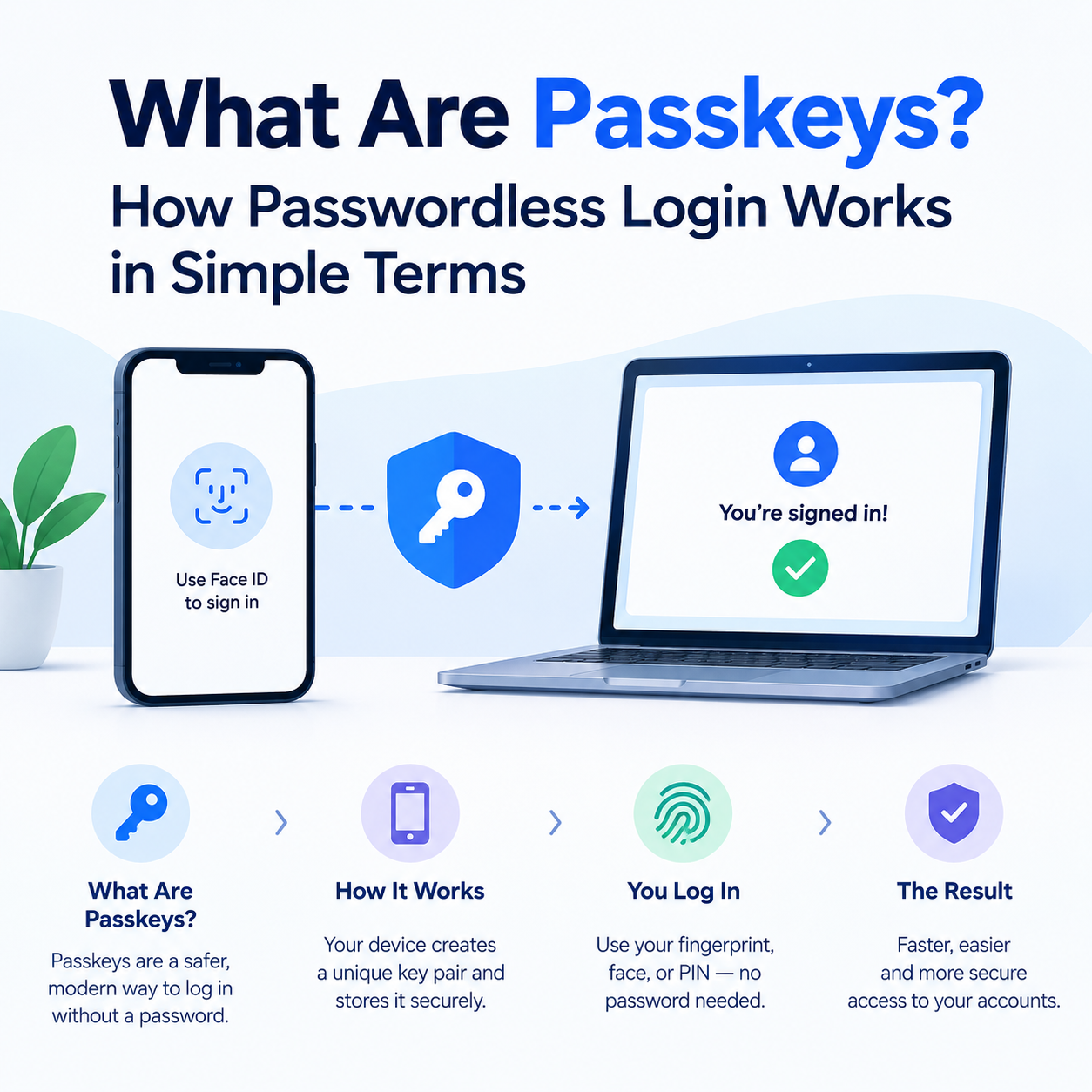
So, what are passkeys? Passkeys are passwordless login credentials based on public-key cryptography. Instead of storing a password that you type into a website, your device uses a cryptographic key pair to prove that you are authorized to access your account.
The result is a login experience that can be both easier for beginners and more resistant to phishing than traditional password-based authentication.
But there is some important technology working behind that simple fingerprint prompt.
Let's break it down.
What Is a Passkey?
A passkey is a password replacement that lets you sign into a supported website or app using a device or passkey manager instead of typing a password.
When you create a passkey, a unique cryptographic key pair is created:
Private key: kept by your device or passkey provider
Public key: registered with the website or app
Biometric/PIN: used to authorize use of the passkey on your device
The website does not receive your private key.
This is one of the major differences between passkeys and passwords. With a traditional password, you provide a shared secret. With passkeys, authentication uses public-key cryptography instead.
A simple example
Think of a passkey like a special digital key.
Your account has a lock.
Your device holds the matching key.
When you log in, the website asks your device to prove that it has the correct key. Your phone then asks you to verify yourself with your fingerprint, face, PIN, or another device-unlock method.
The website receives the cryptographic proof—not your fingerprint.
How Do Passkeys Work?
The technical process sounds complicated, but the basic idea is surprisingly simple.
1. You create a passkey
Suppose a website offers:
“Create a passkey.”
You approve it using your phone, computer or passkey provider.
A unique cryptographic key pair is created for that particular service.
2. The website stores the public key
The website keeps the public key associated with your account.
The private key remains protected by your device or passkey provider.
3. You return later to log in
Instead of entering your password, you choose the passkey login option.
The website sends a cryptographic challenge.
4. Your device verifies you
Your device asks you to use your fingerprint, face, PIN, pattern or another supported screen-unlock method.
5. Your device proves possession of the private key
The private key is used to respond to the website's challenge.
The website verifies the response using the public key it already has.
If everything matches, you're signed in.
You never have to type the private key—and you don't need to remember a password.
FIDO describes passkeys as FIDO credentials based on public-key cryptography, with credentials bound to the service's domain. This domain binding is a major reason they are resistant to phishing.
Why Don't Passkeys Need Passwords?
Passwords are a shared secret.
You know the password, and the service needs information that can verify that password.
That creates several familiar problems.
People can:
Reuse passwords
Choose weak passwords
Forget passwords
Store passwords insecurely
Accidentally enter passwords on fake websites
Have passwords exposed during database breaches
Passkeys approach authentication differently.
The service doesn't need your private key. It stores the corresponding public key and uses cryptographic verification when you sign in.
That means a database containing passkey public keys isn't equivalent to a database containing everyone's login passwords. FIDO specifically highlights this difference as a security advantage.
Passkey vs Password: What's the Difference?
The biggest practical difference is this:
A password can be copied and entered somewhere else. A passkey is designed to authenticate against the legitimate service for which it was created.
Passkey vs 2FA: Are They the Same Thing?
No.
2FA (two-factor authentication) adds another authentication factor to a login. For example:
Password + OTP
A passkey can replace the password-based login process entirely.
When you use a passkey, your device may require a fingerprint, face scan or PIN before allowing the cryptographic credential to authenticate you.
This can make the overall login process both passwordless and phishing-resistant.
It's also important not to assume that every second factor is equally resistant to phishing. FIDO specifically distinguishes passkeys from methods such as OTP codes, which can still be entered into a phishing website.
Are Passkeys Safe and Secure?
For supported implementations, passkeys are designed to provide strong security and phishing resistance.
There are several reasons.
They are unique to the service
Passkeys use cryptographic credentials associated with the service's domain.
A passkey created for one website isn't simply a password that can be copied and reused on another website.
Your private key isn't given to the website
The service receives the public key, while the private key remains protected by the authenticator or passkey provider.
Biometrics stay on the device
If you use your fingerprint or face to unlock a passkey, that biometric verification is performed locally by the device rather than being sent to the website as authentication data.
Phishing is much harder
A traditional phishing website can ask:
“Enter your password.”
It can then steal what you type.
A passkey doesn't work that way. Its authentication is tied to the legitimate service's origin, which is a core part of its phishing resistance.
Can Passkeys Be Hacked?
No security system should be described as completely impossible to attack.
Passkeys significantly reduce some major attack paths, especially password theft and phishing, but they don't make every other part of an account magically secure.
For example, attackers could still target:
Your device
Your account recovery process
Your passkey provider account
Malware on a compromised device
Social engineering
Poorly designed application security
The distinction matters.
A passkey can be cryptographically secure while the surrounding account or device environment still has weaknesses.
The FIDO Alliance has also noted that security research can uncover vulnerabilities in implementations or surrounding environments without demonstrating a weakness in the underlying passkey cryptography itself.
So the realistic answer to “Are passkeys secure?” is:
Passkeys are designed to provide strong, phishing-resistant authentication, but they don't eliminate every possible security risk.
What Are Synced and Device-Bound Passkeys?
You may encounter two different types of passkeys.
Synced passkeys
These can be synchronized across your devices through a passkey provider.
For example, a passkey may be available across multiple devices associated with the same ecosystem or provider.
This makes recovery and device changes easier.
FIDO says synced passkeys use end-to-end encryption for synchronization.
Device-bound passkeys
These are tied to a particular device or security key and aren't designed to be copied to other devices.
They can provide stronger device-specific control, although they can also require more careful planning for recovery.
For everyday consumers, synced passkeys can be particularly convenient because losing one device doesn't necessarily mean losing access to every passkey.
How to Use Passkeys on Android
Android supports passkeys through compatible websites, apps and password managers.
A typical process looks like this:
Open a website or app that supports passkeys.
Sign into your account.
Look for an option such as Create a passkey.
Follow the on-screen instructions.
Confirm using your fingerprint, face recognition, PIN or screen lock.
Your passkey is saved by your supported password manager.
The next time you sign in, select the passkey option and authenticate.
Google's Android documentation confirms that passkeys can be created using supported biometric authentication or device credentials and can be synced through the password manager.
Not every website or app supports passkeys yet, so the exact menu will vary.
How to Use Passkeys on iPhone
On supported services, an iPhone can create and use passkeys through Apple's password-management ecosystem.
The general experience is similar:
Sign into a supported website or app.
Choose the option to create a passkey.
Approve the passkey creation.
Authenticate using Face ID, Touch ID or your device passcode.
The passkey is stored by the supported credential manager.
Use the saved passkey when signing in again.
The important thing to remember is that Face ID or your fingerprint isn't the passkey itself.
They are used to authorize access to the credential stored on your device or passkey provider.
What About Passkeys on Google?
Google accounts support passkey-based sign-in.
The basic experience is similar to other supported services: you create a passkey and later authenticate using a supported device or passkey provider rather than entering a traditional password.
Google's Android documentation also describes passkeys as credentials that can be used across devices through supported password-manager synchronization.
The exact interface can change as Google updates its account and password-management experience, so users should follow the current instructions displayed in their Google Account.
What Happens If You Lose Your Passkey?
This is one of the most important questions beginners have.
The answer depends on where your passkey is stored.
If you use a synced passkey, the credential may remain available through your passkey provider on another device.
If you use a device-bound passkey, losing the device can require another registered authentication method or the service's account-recovery process.
That's why it's important not to think:
“I have one passkey, and if I lose my phone, my account is gone.”
Instead, think about account recovery before you need it.
For important accounts, make sure you understand:
Which passkey provider stores your credential
Whether the passkey is synced
Which other devices can authenticate
What recovery options the service provides
How you can regain access if your primary device disappears
FIDO's guidance distinguishes synced passkeys from device-bound credentials specifically because their recovery and portability characteristics differ.
Common Passkey Mistakes Beginners Should Avoid
Passkeys remove many password-related problems, but good security habits still matter.
1. Don't ignore account recovery
A strong login method doesn't replace the need for a sensible recovery plan.
2. Protect your device
If someone can freely unlock your phone or computer, your authentication environment is at risk.
Use a strong device PIN and the security features provided by your operating system.
3. Understand where your passkeys are stored
Know whether you're using a synced passkey, device-bound credential or third-party password manager.
4. Don't approve unexpected login requests
If your device suddenly asks you to authenticate when you weren't trying to sign in, stop and investigate.
5. Keep important accounts diversified
For critical accounts, consider having appropriate recovery methods or additional registered authentication devices where the service supports them.
Passkeys Explained in One Simple Example
Imagine your house has a unique lock.
Instead of remembering a different number combination for the lock every day, your phone keeps a special digital key.
When you want to open the door:
Website: “Prove you have the key.”
Phone: “First, prove you're the owner.”
You: Fingerprint
Phone: “Okay.”
Phone: Uses the protected cryptographic key
Website: “Verified. Welcome.”
That's essentially the idea behind passkey authentication.
The technology underneath is sophisticated, but the user experience is intentionally simple.
The Bottom Line: What Are Passkeys?
So, what are passkeys?
Passkeys are passwordless authentication credentials that use cryptographic key pairs instead of traditional passwords. Your device or passkey provider protects the private key, while the website stores the corresponding public key.
When you log in, your fingerprint, face, PIN or device credential authorizes the use of that passkey.
Their biggest advantage isn't simply that you don't have to remember another password. Passkeys are designed to make phishing, password reuse and stolen-password attacks much harder.
They aren't a magic shield against every cyberattack, but they represent a significant change in how people authenticate online. FIDO currently describes passkeys as passwordless, phishing-resistant credentials supported across major operating systems, browsers and passkey providers.
For beginners, the easiest way to remember the concept is:
Your password proves something you know. A passkey lets your device prove something it has, after you authorize it.
FAQs
1. What is a passkey?
A passkey is a passwordless login credential based on public-key cryptography. It allows you to authenticate to supported websites and apps using a device, password manager or security key instead of typing a password.
2. Are passkeys safer than passwords?
Passkeys are designed to be resistant to phishing and avoid many risks associated with password reuse and password databases. However, they don't eliminate every security risk, such as a compromised device or weak account-recovery process.
3. Can passkeys be hacked?
Passkeys can exist within broader systems that may have vulnerabilities, but the passkey authentication design itself is intended to resist phishing and protect private keys. Security also depends on the device, passkey provider and account-recovery system.
4. Is my fingerprint stored by the website when I use a passkey?
No. When biometric authentication is used, the biometric check is performed locally on the device. The website receives cryptographic authentication rather than your fingerprint or face data.
5. What happens if I lose my phone with my passkey?
It depends on the type of passkey. Synced passkeys can remain available through the relevant passkey provider on other devices, while device-bound credentials may require another registered authenticator or the service's recovery process.